Changes to SpeedGrader
Grading and Feedback 13 January 2026
Overview
From the start of Semester 2 there will be minor changes to the SpeedGrader interface in Canvas. Canvas has implemented these changes to improve performance including reduction in crashes and faster loading times, particularly for large cohorts. These changes should hopefully improve the marking experience for staff.
Changes to the SpeedGrader interface
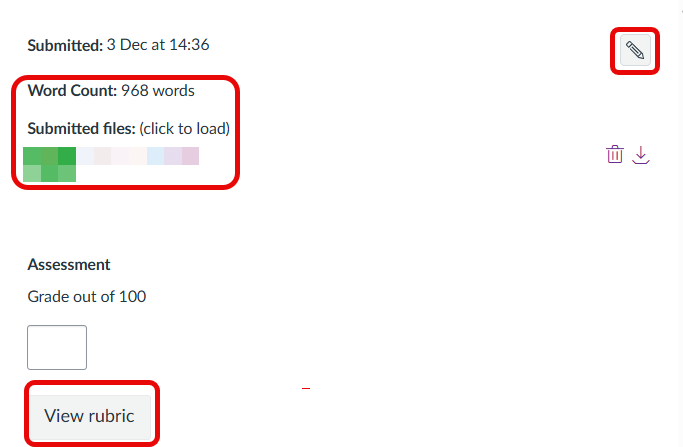
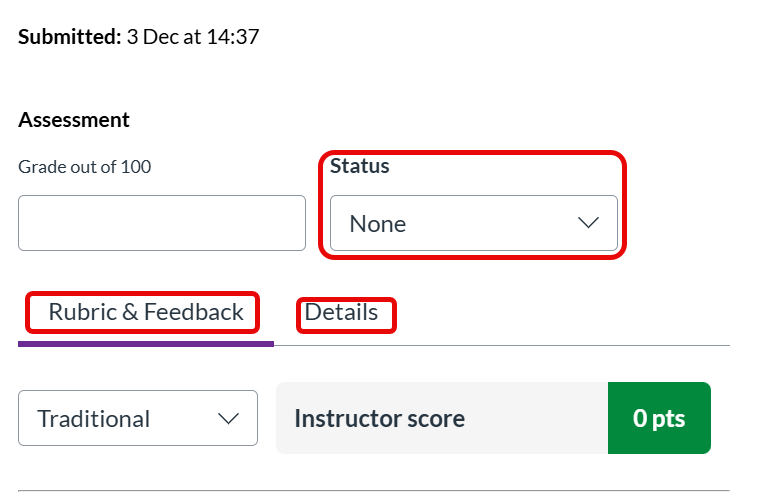
The same features in SpeedGrader are still available. Below is a quick summary of the changes to the interface together with a side by side screenshot comparison.
- Rubrics are instantly visible in the new interface under the tab Rubric and Feedback. Staff no longer need to click on a ‘view rubric’ button. By default the Rubric will show in traditional grid view for consistency.
- A new Details tab has been added. The word count and a link to the student’s submitted file can be found here. (Word count and file link previously appeared at the top of the SpeedGrader interface).
- The option to select an assignment as ‘Late, Missing, Extended, Excused or None’ is now more clearly labelled as ‘Status’, with a drop down field to select status. (These options were previously accessible via a pencil icon).